22 Şubat 2010

16 Şubat 2010
Weblogic boot.properties
To avoid weblogic asking username-password for every server boot, create file boot.properties in /middleware/user_projects/domains/YourDomain/servers/YourServer/security
boot.properties file is like:
username=weblogic
password=weblogicpassword
boot.properties file is like:
username=weblogic
password=weblogicpassword
15 Şubat 2010
Apache Directory Studio fails to show OID objects
If you suddenly start getting following error while browsing OID with ADS:
Error while reading entry
[LDAP: error code 53 - Attribute orclrevpwd can be searched only over a mutually authenticated SSL session.
and you did not mess with the "orclrevpwd" attribute at all, (or did not set orcldataprivacymode to 1) ;
try disabling "Show operational attributes" of Apache at:
Window > Preferences > Entry Editor.
Error while reading entry
[LDAP: error code 53 - Attribute orclrevpwd can be searched only over a mutually authenticated SSL session.
and you did not mess with the "orclrevpwd" attribute at all, (or did not set orcldataprivacymode to 1) ;
try disabling "Show operational attributes" of Apache at:
Window > Preferences > Entry Editor.
01 Şubat 2010
FMW System Requirements and Specifications 11g
http://www.oracle.com/technology/software/products/ias/files/fusion_requirements.htm
26 Ocak 2010
ODIP Debug Levels
I was looking for the debug levels of Oracle Directory Integration Platform. Apparently it is not documented for 11G at integration guide, found it on 10G's.
add respective values and store in orclodipprofiledebuglevel attribute of the sync. profile
From Oracle® Identity Management Integration Guide 10g (10.1.4.2):
Table 4-3 Server Debugging Levels
Debugging Event Type __________________________ Numeric Value
Starting and stopping threads ............................. 1
Refreshing profiles ....................................... 2
Initialization, execution, and end details of connectors .. 4
Details during connector execution ........................ 8
Change record of the connector ............................ 16
Mapping details of the connector .......................... 32
Execution time details of the connector ................... 64
add respective values and store in orclodipprofiledebuglevel attribute of the sync. profile
From Oracle® Identity Management Integration Guide 10g (10.1.4.2):
Table 4-3 Server Debugging Levels
Debugging Event Type __________________________ Numeric Value
Starting and stopping threads ............................. 1
Refreshing profiles ....................................... 2
Initialization, execution, and end details of connectors .. 4
Details during connector execution ........................ 8
Change record of the connector ............................ 16
Mapping details of the connector .......................... 32
Execution time details of the connector ................... 64
21 Ocak 2010
Where does OID store ODIP synchronization profiles
here:
cn=subscriber profile,cn=changelog subscriber,cn=oracle internet directory
not ın any fıle, on the directory itself. those sample property files (the ones in $ORACLE_HOME/ldap/odi/conf) are to export into this particular node - with manageSyncProfiles utility.
cn=subscriber profile,cn=changelog subscriber,cn=oracle internet directory
not ın any fıle, on the directory itself. those sample property files (the ones in $ORACLE_HOME/ldap/odi/conf) are to export into this particular node - with manageSyncProfiles utility.
15 Ocak 2010
OIM Design Console fails to open up.
Had a rough week, my winxp crashed badly. Recovered all my tools back except the OIM design console. There was this stupid error made me to install DConsole several times. Apparently the reason was just about my regional settings. Get it to English and all resolved.
com.thortech.xl.dataaccess.tcDataSetException: Column 'W¦N_TYPE' not found
at com.thortech.xl.dataaccess.tcDataSet.getColumnIndex(Unknown Source)
at com.thortech.xl.dataaccess.tcDataSet.getString(Unknown Source)
at com.thortech.xl.client.base.tcfrmCarrierBase.LoadExplorer(Unknown Source)
at com.thortech.xl.client.base.tcfrmCarrierBase.attach(Unknown Source)
at com.thortech.xl.client.base.tcAppWindow.jbInit(Unknown Source)
at com.thortech.xl.client.base.tcAppWindow.(Unknown Source)
at com.thortech.xl.client.base.tcAppWindow.main(Unknown Source)
com.thortech.xl.dataaccess.tcDataSetException: Column 'W¦N_TYPE' not found
at com.thortech.xl.dataaccess.tcDataSet.getColumnIndex(Unknown Source)
at com.thortech.xl.dataaccess.tcDataSet.getString(Unknown Source)
at com.thortech.xl.client.base.tcfrmCarrierBase.LoadExplorer(Unknown Source)
at com.thortech.xl.client.base.tcfrmCarrierBase.attach(Unknown Source)
at com.thortech.xl.client.base.tcAppWindow.jbInit(Unknown Source)
at com.thortech.xl.client.base.tcAppWindow.
at com.thortech.xl.client.base.tcAppWindow.main(Unknown Source)
03 Aralık 2009
Getting Quick backup of AD users
ldifde -f exportUsers.ldf -s localhost -d "dc=oracle,dc=com" -p subtree -r "(objectCategory=Person)" -m
weblogic corrupts some folders after disk gets full
weblogic can get dirty and corrupt some of its folders after a disk full error of OS. One thing is Adminserver stalls and does not restart. If this is the case, one possible solution is to delete the "ldap" folder under user_projects/domains/yourdomain/servers/AdminServer/data/
It can also corrupt upload folders of Adminserver. If you see errors like
Unable to access the selected application
Exception in AppMerge flows' progression
in deployment console while installing ears from upload folders, this can be solved by deleting respective upload folder, recreating it and copying ear files back. then install.
It can also corrupt upload folders of Adminserver. If you see errors like
Unable to access the selected application
Exception in AppMerge flows' progression
in deployment console while installing ears from upload folders, this can be solved by deleting respective upload folder, recreating it and copying ear files back. then install.
02 Aralık 2009
Killing connected user sessions from an Oracle DB
Killing connected user sessions from an Oracle DB
select sid,serial# from v$session;
(
Use following in a RAC environment:
select sid,serial# from gv$session;
)
Output is something like this:
----- -----
xxx yyy
then for each row run:
alter system kill session 'xxx,yyy' immediate;
select sid,serial# from v$session;
(
Use following in a RAC environment:
select sid,serial# from gv$session;
)
Output is something like this:
----- -----
xxx yyy
then for each row run:
alter system kill session 'xxx,yyy' immediate;
25 Eylül 2009
ORA-01102 Cannot mount database in Exclusive mode
1. Verify that there is not a "sgadef.dbf" file in the directory
"ORACLE_HOME/dbs".
% ls $ORACLE_HOME/dbs/sgadef.dbf
If this file does exist, remove it.
% rm $ORACLE_HOME/dbs/sgadef.dbf
2. Verify that there are no background processes owned by "oracle"
% ps -ef | grep ora_ | grep $ORACLE_SID
If background processes exist, remove them by using the Unix
command "kill". For example:
% kill -9
3. Verify that no shared memory segments and semaphores that are owned
by "oracle" still exist
% ipcs -b
If there are shared memory segments and semaphores owned by "oracle",
remove the shared memory segments
% ipcrm -m
and remove the semaphores
% ipcrm -s
NOTE: The example shown above assumes that you only have one
database on this machine. If you have more than one
database, you will need to shutdown all other databases
before proceeding with Step 4.
4. Verify that the "$ORACLE_HOME/dbs/lk" file does not exist
5. Startup the instance
"ORACLE_HOME/dbs".
% ls $ORACLE_HOME/dbs/sgadef
If this file does exist, remove it.
% rm $ORACLE_HOME/dbs/sgadef
2. Verify that there are no background processes owned by "oracle"
% ps -ef | grep ora_ | grep $ORACLE_SID
If background processes exist, remove them by using the Unix
command "kill". For example:
% kill -9
3. Verify that no shared memory segments and semaphores that are owned
by "oracle" still exist
% ipcs -b
If there are shared memory segments and semaphores owned by "oracle",
remove the shared memory segments
% ipcrm -m
and remove the semaphores
% ipcrm -s
NOTE: The example shown above assumes that you only have one
database on this machine. If you have more than one
database, you will need to shutdown all other databases
before proceeding with Step 4.
4. Verify that the "$ORACLE_HOME/dbs/lk
5. Startup the instance
25 Ağustos 2009
LDIF Notes 1: Adding / Deleting a user to/from a group using LDIF
Add user to group:
dn: cn=group,cn=Groups,dc=blah,dc=blah,dc=blaah
changetype: modify
add: uniquemember
uniquemember: cn=memberefendi,cn=Users,dc=blah,dc=blah,dc=blaah
Delete user from group:
dn: cn=group,cn=Groups,dc=blah,dc=blah,dc=blaah
changetype: modify
delete: uniquemember
uniquemember: cn=memberefendi,cn=Users,dc=blah,dc=blah,dc=blaah
dn: cn=group,cn=Groups,dc=blah,dc=blah,dc=blaah
changetype: modify
add: uniquemember
uniquemember: cn=memberefendi,cn=Users,dc=blah,dc=blah,dc=blaah
Delete user from group:
dn: cn=group,cn=Groups,dc=blah,dc=blah,dc=blaah
changetype: modify
delete: uniquemember
uniquemember: cn=memberefendi,cn=Users,dc=blah,dc=blah,dc=blaah
13 Haziran 2009
adding an index to an attribute:
addAttribute.txt:
dn: cn=catalogs
changetype: modify
add: orclindexedattribute
orclindexedattribute: departmentnumber
ldapmodify -h localhost -p 389 -D "cn=orcladmin" -f addAttribute.txt
ps: there should not be any objects having this attribute. meaning: put the index first, then create/import objects.
dn: cn=catalogs
changetype: modify
add: orclindexedattribute
orclindexedattribute: departmentnumber
ldapmodify -h localhost -p 389 -D "cn=orcladmin" -f addAttribute.txt
ps: there should not be any objects having this attribute. meaning: put the index first, then create/import objects.
Howto change query size in OID
OID defaults to 1000 entries for every search operation. Importing following ldif will change the orclsizelimit resultset size:
changeSize.txt
dn:
changetype: modify
replace: orclsizelimit
orclsizelimit: 50000
ldapmodify -h localhost -p 389 -D "cn=orcladmin" -f changeSize.txt
changeSize.txt
dn:
changetype: modify
replace: orclsizelimit
orclsizelimit: 50000
ldapmodify -h localhost -p 389 -D "cn=orcladmin" -f changeSize.txt
14 Mayıs 2009
Oracle Fusion Middleware Acronyms
Following is a list of acronyms we use specifically for fusion products:
ADF Oracle Application Development Framework
B2B Oracle B2B
BAM Oracle Business Activity Monitoring
BI Oracle Business Intelligence
BPA Oracle Business Process Analysis
BPEL Oracle BPEL Process Manager
BPM Oracle Business Process Management
CEP Oracle Complex Event Processing
DIP Oracle Directory Integration Platform
EM Oracle Enterprise Manager
EPM Oracle Enterprise Performance Management
ESSO Oracle Enterprise Single Sign-On
HPM Oracle Hyperion Performance Management
IPM Oracle Imaging and Process Management
IRM Oracle Information Rights Management
JDev Oracle JDeveloper
JRF Oracle Java Resource Files
OAAM Oracle Adaptive Access Manager
OAM Oracle Access Manager
OBI EE Oracle Business Intelligence Enterprise Edition
OC4J Oracle Containers for J2EE
ODI Oracle Data Integrator
ODSI Oracle Data Service Integrator
ODSM Oracle Directory Services Manager
OER Oracle Enterprise Repository
OES Oracle Entitlement Server
OIA Oracle Identity Analytics
OID Oracle Internet Directory
OIF Oracle Identity Federation
OIM Oracle Identity Management Services
ORM Oracle Role Manager
OSB Oracle Service Bus
OSR Oracle Service Registry
OVD Oracle Virtual Directory
OWCI Oracle WebCenter Interaction
OWSM Oracle Web Services Manager
PS Oracle Patch Set
SB FS Oracle Service Bus for Financial Services
SSO Oracle Single Sign-On
UCM Oracle Universal Content Management
WLI Oracle WebLogic Integration
WLOC Oracle WebLogic Operations Control
WLP Oracle WebLogic Portal
WLS Oracle WebLogic Server
ADF Oracle Application Development Framework
B2B Oracle B2B
BAM Oracle Business Activity Monitoring
BI Oracle Business Intelligence
BPA Oracle Business Process Analysis
BPEL Oracle BPEL Process Manager
BPM Oracle Business Process Management
CEP Oracle Complex Event Processing
DIP Oracle Directory Integration Platform
EM Oracle Enterprise Manager
EPM Oracle Enterprise Performance Management
ESSO Oracle Enterprise Single Sign-On
HPM Oracle Hyperion Performance Management
IPM Oracle Imaging and Process Management
IRM Oracle Information Rights Management
JDev Oracle JDeveloper
JRF Oracle Java Resource Files
OAAM Oracle Adaptive Access Manager
OAM Oracle Access Manager
OBI EE Oracle Business Intelligence Enterprise Edition
OC4J Oracle Containers for J2EE
ODI Oracle Data Integrator
ODSI Oracle Data Service Integrator
ODSM Oracle Directory Services Manager
OER Oracle Enterprise Repository
OES Oracle Entitlement Server
OIA Oracle Identity Analytics
OID Oracle Internet Directory
OIF Oracle Identity Federation
OIM Oracle Identity Management Services
ORM Oracle Role Manager
OSB Oracle Service Bus
OSR Oracle Service Registry
OVD Oracle Virtual Directory
OWCI Oracle WebCenter Interaction
OWSM Oracle Web Services Manager
PS Oracle Patch Set
SB FS Oracle Service Bus for Financial Services
SSO Oracle Single Sign-On
UCM Oracle Universal Content Management
WLI Oracle WebLogic Integration
WLOC Oracle WebLogic Operations Control
WLP Oracle WebLogic Portal
WLS Oracle WebLogic Server
05 Mayıs 2009
LDAP Admin 101
I am being an ldap guy these days so I need to keep track of what's going on.
Dealing with an ldap server (having ten thousands of objects) for 15 minutes and you'll see that a decent ldap client (i.e. Apache Directory Studio or LdapAdmin etc.) is quite painful to move object masses around. You will eventually need the following console commands, ldapsearch,ldapmodify,ldapadd and ldapdelete. These 4 will basically do almost everything you need ...
What I am dealing with currently is Oracle Internet Directory btw.
1. ldapsearch: Best way to count, sort, search and export massive objects.
To find out number of objects under a node, go with:
ldapsearch -h localhost -p 389 -x -s sub -b "cn=Users,dc=example,dc=com" -D "cn=orcladmin" -w welcome1 "objectclass=*" dn > searchMe.txt
This will put all dns under cn=Users to the txt file. You can tail it and see how many records it returns...
will go on this later...
Dealing with an ldap server (having ten thousands of objects) for 15 minutes and you'll see that a decent ldap client (i.e. Apache Directory Studio or LdapAdmin etc.) is quite painful to move object masses around. You will eventually need the following console commands, ldapsearch,ldapmodify,ldapadd and ldapdelete. These 4 will basically do almost everything you need ...
What I am dealing with currently is Oracle Internet Directory btw.
1. ldapsearch: Best way to count, sort, search and export massive objects.
To find out number of objects under a node, go with:
ldapsearch -h localhost -p 389 -x -s sub -b "cn=Users,dc=example,dc=com" -D "cn=orcladmin" -w welcome1 "objectclass=*" dn > searchMe.txt
This will put all dns under cn=Users to the txt file. You can tail it and see how many records it returns...
will go on this later...
03 Mayıs 2009
Import/Export Objects between two LDAP servers with ldapsearch, and ldapadd
I am having a lot of trouble with moving data between two ldap servers, with a GUI tool it really is messy, so I had to use good old fashioned console commands.
1. Export data into an ldif with ldapsearch:
ldapsearch -x -h [hostname] -p [port] -D [adminuserdn] -w [adminuserpassword] -b [searchbasedn] -s sub "objectclass=*" dn objectclass cn sn employeenumber > export.ldif
the stuff coming at the very end of the command is the list of attributes that I want to include in ldif. Default is include all.. If object has some attributes that is not allowed to be imported (like encrypted passwords etc.) you have to leave them out.
2. Import data into the target ldap server:
ldapadd -x -c -v -h [hostname] -p [port] -D [adminuserdn] -w [adminuserpassword] -f export.ldif -S export.ldif.log
1. Export data into an ldif with ldapsearch:
ldapsearch -x -h [hostname] -p [port] -D [adminuserdn] -w [adminuserpassword] -b [searchbasedn] -s sub "objectclass=*" dn objectclass cn sn employeenumber > export.ldif
the stuff coming at the very end of the command is the list of attributes that I want to include in ldif. Default is include all.. If object has some attributes that is not allowed to be imported (like encrypted passwords etc.) you have to leave them out.
2. Import data into the target ldap server:
ldapadd -x -c -v -h [hostname] -p [port] -D [adminuserdn] -w [adminuserpassword] -f export.ldif -S export.ldif.log
04 Nisan 2007
Eclipse - Tomcat - Struts
Since there is a long way for me to play around with struts, I have decided to work with a simpler environment (then jboss). If you don't have any EJB architectural issues, tomcat is quite a reasonable playground for struts learning.
Anyways here is what I have done:
settingUpTomcatEclipseStrutsEnv.log:
- Downloaded tomcat5.5.23 here.
- Installed tomcat (just unzip it somewhere :)
- Downloaded Sysdeo Eclipse tomcat plugin here.
Notes on sysdeo: I tried tomcatPluginV32beta3 with Tomcat 6, it can start stop tomcat just fine but had some troubles when I tried to deploy and debug, so I did not argue, just switched to Tomcat 5.5
- Installed Sysdeo (copy it to the plugins directory of Eclipse as usual and restart Eclipse. )
- Told Eclipse where Tomcat is living (see shots below)
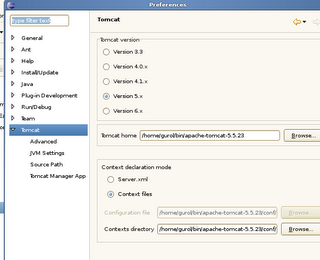
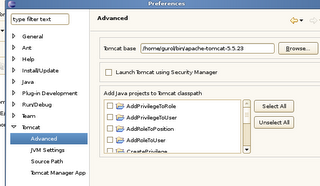

- Downloaded Struts 2.0.6 from here
- Unpacked it somewhere, jumped into docs folder, spent a week
thats it. looks quite simple but really putting right versions together takes a lot of time. I will report my training stories as it goes on...
Anyways here is what I have done:
settingUpTomcatEclipseStrutsEnv.log:
- Downloaded tomcat5.5.23 here.
- Installed tomcat (just unzip it somewhere :)
- Downloaded Sysdeo Eclipse tomcat plugin here.
Notes on sysdeo: I tried tomcatPluginV32beta3 with Tomcat 6, it can start stop tomcat just fine but had some troubles when I tried to deploy and debug, so I did not argue, just switched to Tomcat 5.5
- Installed Sysdeo (copy it to the plugins directory of Eclipse as usual and restart Eclipse. )
- Told Eclipse where Tomcat is living (see shots below)
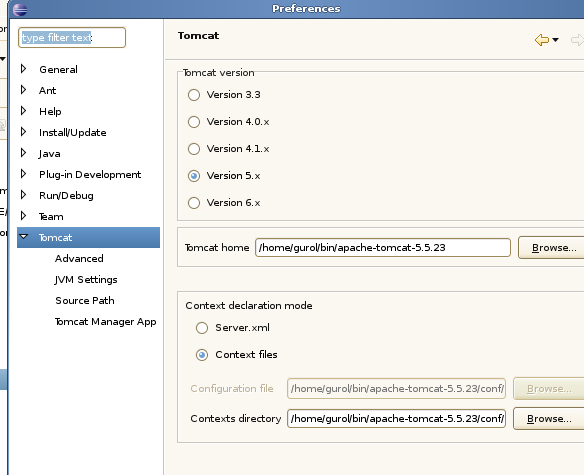
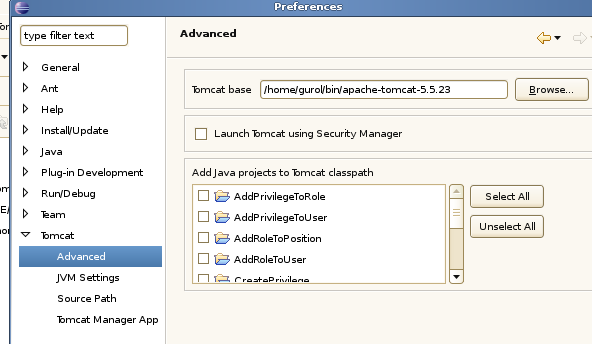

- Downloaded Struts 2.0.6 from here
- Unpacked it somewhere, jumped into docs folder, spent a week
thats it. looks quite simple but really putting right versions together takes a lot of time. I will report my training stories as it goes on...
01 Nisan 2007
Eclipse with WTP
Eclipse has a webtools plugin (http://www.eclipse.org/webtools) which really fills eclipse with many handy tools.
There is a nice tutorial here guiding setting up a development environment with tomcat.
There is a nice tutorial here guiding setting up a development environment with tomcat.
Building a dev environment with Eclipse and jboss
I am trying to figure out how struts 2 (http://struts.apache.org) can help easing web development. It took my two days (two f days!!) to build an environment to come up with a Hello World :) I got stuck with a stupid mistake I have made and found the solution on a blog post. So I have decided to post my experience here maybe it will help someone else...
Anyways first thing to do was to setup eclipse working with an application server to easy deploy and debug. I am using jboss 4.0.5 and eclipse 3.2.2. First thing comes to mind is sure to have JBoss IDE for Eclipse. (http://labs.jboss.com/portal/jbosside/download/index.html) And here comes the first problem. Last stable version of JBossIDE is not working with Eclipse 3.2 or later. There is a nice arguing going on at jboss forums between ide developers and angry users. You have to use JBoss IDE 2.0.0Beta with Eclipse 3.2 And with Eclipse 3.2 I faced with a bug at packaging so I upgraded Eclipse to 3.2.2
BTW for those who want to make a clean jboss installation, do not download the jbossx.x.x.zip file if you don't want to make configurations manually (which might be quite messy) rather use jems-installer jar. Makes life much easier.
Struts stories later...
Anyways first thing to do was to setup eclipse working with an application server to easy deploy and debug. I am using jboss 4.0.5 and eclipse 3.2.2. First thing comes to mind is sure to have JBoss IDE for Eclipse. (http://labs.jboss.com/portal/jbosside/download/index.html) And here comes the first problem. Last stable version of JBossIDE is not working with Eclipse 3.2 or later. There is a nice arguing going on at jboss forums between ide developers and angry users. You have to use JBoss IDE 2.0.0Beta with Eclipse 3.2 And with Eclipse 3.2 I faced with a bug at packaging so I upgraded Eclipse to 3.2.2
BTW for those who want to make a clean jboss installation, do not download the jbossx.x.x.zip file if you don't want to make configurations manually (which might be quite messy) rather use jems-installer jar. Makes life much easier.
Struts stories later...
Kaydol:
Kayıtlar (Atom)